

As the ecommerce industry grows more complex and privacy regulations continue to tighten, server-side tagging ecommerce strategies are non-negotiables for merchants. If you want accurate tracking, faster websites, and compliance-ready data flows, you’ll need to prioritize server-side Google Tag Manager (SGTM) ecommerce tracking.
If you’re not sure where to begin, the following server-side tagging ecommerce guide will unpack everything you need to know, including which event model you’ll need and how to apply Consent Mode v2. You’ll also gain insights into validating server-side event deliveries in Google Ads 4 (GA4), as well as which success metrics you should be listening to.
Defining Required Ecommerce Events and Parameters for Effective Event Modeling
The cornerstone of a reliable server-side tagging ecommerce analytics implementation is a clearly defined event model. Think of it as the “blueprint” that ensures your client-side events and server-side events speak the same language.
Without a standardized event model, it’s common for discrepancies, like inflated revenue, missing cart data, or double-counted purchases, to arise. These not only serve to frustrate both marketing teams and developers, but they also make optimization nearly impossible.
To that end, before you can dive deeper into your server-side tagging ecommerce strategy, you’ll need to document each event with the following information:
- Name: Follow GA4 naming conventions
- Trigger Condition: Define triggers, such as “on page load” or “on button click”
- Required Parameters: Address transaction ID, currency, and product details
- Optional Parameters: Coupons or affiliations
Adding relevant optional parameters provides additional pieces of the puzzle for more comprehensive event tracking. But if any mandatory parameters are missing, your event data will be incomplete and potentially inaccurate.
Core Ecommerce Events
For most ecommerce businesses, GA4 and similar ad platforms expect these four primary events:
- View Item: Fires on a product detail page; includes parameters such as item ID, item name, price, and currency
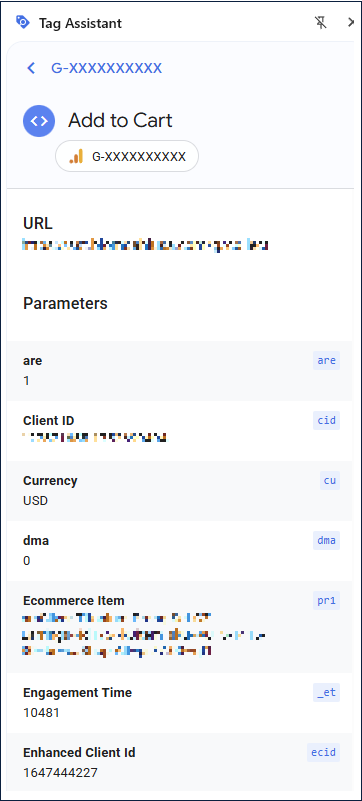
- Add to Cart: Fires when a user adds a product to their cart; includes parameters such as item ID, item name, price, quantity, and currency
- Begin Checkout: Fires when a user initiates the checkout flow; includes parameters such as transaction ID, value, currency, and items
- Purchase: Fires on the thank you/confirmation page; requires parameters such as transaction ID, value, currency, coupon, and items
Defining these events with precision ensures your GA4 server-side payloads match what the frontend sends.
Why Event Parity Matters
The event parity principle states that the client-side and server-side versions of an event should match exactly. For example, if the client sends a purchase with a transaction ID of “T12345”, the server-side payload should also include “T12345;” it should not regenerate an item ID.
If parity breaks down, you’ll run into problems such as:
- Double Counting: Both client and server events will log the same purchase without deduplication
- Attribution Loss: Mismatched client IDs will make your campaigns look less effective
- Data Integrity Issues: Revenue won’t reconcile with your financial systems
The best practice is to document a single source of truth for each parameter and ensure that both the client and server use it in order to maintain parity.
Consent Mode V2 Behavior and Server-Side Routing
Consent Mode v2 has introduced new signals (ad user data and ad personalization) on top of ad storage and analytics storage. For ecommerce businesses, these impact your ability to send customer and conversion data depending on explicit user consent.
For instance, a European visitor who denies consent should not have their transaction forwarded to Google Ads with personal identifiers. However, you may still be allowed to gather aggregated or anonymized analytics. These changes protect you legally and work to build trust with users, all while still letting you collect high-value insights.
Default and Update States
Here’s an example of implementing Consent Mode v2 with gtag:
<script>

// Default on page load

gtag('consent', 'default', {

  'ad_storage': 'denied',

  'analytics_storage': 'granted',

  'ad_user_data': 'denied',

  'ad_personalization': 'denied',

  'wait_for_update': 500

});

// On accept

gtag('consent', 'update', {

  'ad_storage': 'granted',

  'ad_user_data': 'granted',

  'ad_personalization': 'granted'

});

</script>
You can use this pattern to ensure the browser holds off on sending restricted data until the user provides consent.
Server-Side Routing Plan
Once the client captures the consent state, the server-side tag manager (sGTM) becomes the enforcement layer. Here’s how the data flows:
- Client fires the event with consent state
- The sGTM endpoint receives the payload
- The server applies business rules:
- If Consent is Denied: The data is stripped or aggregated for compliance
- If Consent is Granted: The full payload is forwarded to GA4/Ads
Setting up this type of routing provides a fast user experience without compromising compliance.
Server-Side Event Delivery (GA4 Measurement Protocol)
Events are sent to GA4 via the Measurement Protocol. Here’s an example purchase event sent from the server:
{

  "client_id": "12345.67890",

  "events": [{

    "name": "purchase",

    "params": {

      "transaction_id": "T12345",

      "currency": "USD",

      "value": 99.95,

      "items": [{

        "item_id": "SKU123",

        "item_name": "Product Name",

        "price": 99.95,

        "quantity": 1

      }]

    }

  }]

}
Notice that the transaction ID, currency, and items align with the event model. That is to ensure that GA4 revenue reports reconcile with your platform’s sales data.
QA Testing and Validation
Your quality assurance (QA) processes must be thorough to ensure your architecture delivers results. Testing should cover both client-side and server-side delivery, but it should also go further into structured validation, automation, and documentation.
Regardless, a good QA process starts with clear test cases. For each ecommerce event, define the expected trigger, required parameters, and success conditions. A purchase test case, for instance, might require confirming that the transaction ID, product array, and revenue values all match between the ecommerce platform and GA4. Document these cases in a central log so that anyone on the team can replicate your tests.
Automation is another crucial step in QA processes. Many teams create scripts or use monitoring platforms that regularly ping the sGTM endpoint with test payloads. These automated checks can help catch silent failures before they wreck your data.
Tag Assistant + DebugView
Google’s Tag Assistant is the first line of defense in the QA space for server-side tagging configurations. It allows you to confirm that events are firing in the browser with the correct parameters. Alongside GA4’s DebugView, which allows you to cross-check payloads in real time, both tools are invaluable for identifying potential flaws in your event model architecture.
Parity Checks
Parity checks ensure that your client-side and server-side events match exactly. The revenue, currency, and product details need to be identical, but perhaps the most important metric to validate when working in ecommerce is purchase parity, which verifies that each order or transaction ID sent from the client is also recorded in the server-side payload. Spot-checking ten to twenty transactions each week will help you validate parity.
Common Pitfalls
If you cut corners during your testing and validation phases, you may encounter the following headaches:
- Double-Counted Purchases: Both client and server send purchases without deduplication rules
- Missing Parameters: If something like currency is not passed, it creates GA4 errors
- Consent Mismatch: The server sends data even when a user denies consent
- Latency: Poorly configured sGTM containers slow down the checkout flow and frustrate users
Each of these concerns can be prevented by documenting an event model and testing regularly. Anticipating these headaches and following through with ongoing parity checks will help ensure a clean, scalable setup.
Acceptance Criteria to Define Success
Determining whether your server-side tagging ecommerce strategy is working is a matter of figuring out whether you are hitting these acceptance benchmarks:
- Event Integrity: 100% parity between client and server purchase events
- Performance: Largest Contentful Paint (LCP) load time of less than 2.5 seconds
- SEO/Indexing: Max crawl depth of three clicks or less, and zero indexable parameterized pages
- Rich Results: Zero Rich Results warnings
- Schema: Product schema that aligns with GA4 event parameters
- Consent Compliance: 0% events being sent without the required consent state
- QA Standards: Weekly parity checks and DebugView audits at least once per month or quarter
These criteria establish a form of accountability for developers and provide you with target thresholds to aim for during the QA process.
Frequently Asked Questions
What Is Server-Side Tagging in Ecommerce?
A server-side tagging ecommerce strategy refers to the practice of shifting the action of tracking tags from a shopper’s browser to a secure server environment. Traditionally, analytics and marketing pixels load directly on a user’s device, which can slow down page speed or be blocked by ad blockers. You may also unintentionally expose sensitive customer data.
With the server-side Google Tag Manager (sGTM), you can route that data to a server you control first and foremost. And as the data comes through that server, you can validate and filter it before forwarding it to an analytics or ad platform.
Changing up your approach in such a way improves data accuracy and reduces client-side load times, which enhances the consumer experience. You can also comply with privacy regulations like the General Data Protection Regulation (GDPR).
What’s the Difference Between Client vs. Server Events?
Client-side events fire directly in the shopper’s browser when an action occurs, such as adding a product to their cart. These events are easy to implement but prone to issues, such as ad blockers that may prevent them from firing. Poor network conditions can also cause data loss.
Server-side events, in contrast, are processed on your server before being sent to platforms like GA4 or Facebook Ads. That ensures more reliable delivery, as the data will not be subject to browser restrictions. It also allows you to control what information gets passed along, which is crucial for privacy compliance and data governance.
Can I Still Use Google Tag Manager?
Yes, you can; in fact, Google designed the Server-Side Google Tag Manager specifically to help businesses migrate their tracking away from client-side JavaScript tags. With it, you’ll host a container on Google Cloud or another server, and any incoming browser events will be processed there before being sent on to platforms like GA4, Google Ads, or Meta.
Transitioning to an sGTM setup also reduces page bloat, improving site performance, and you’ll also achieve greater control over which data leaves your domain. If you are already using Google Tag Manager on your site, migrating to sGTM is a logical next step that enhances both speed and data security.
How Do I Test Server-Side Ecommerce Tracking?
Testing your server-side ecommerce setup is essential to avoid inaccurate reporting. Start by using the Tag Assistant in Chrome to confirm that your client-side tags fire correctly and include all required parameters (like transaction ID, currency, and items).
Next, open the GA4 DebugView to check that events sent from your sGTM container appear in real time. Compare client and server payloads to ensure their purchase IDs and revenue values match. You can achieve deeper validation by exporting the data into BigQuery and running reconciliation queries against your platform’s order data. You’ll also want to schedule recurring audits to catch issues before they impact your data.
Which Platforms Benefit Most?
When it comes to implementing server-side tagging, ecommerce businesses of any size and shape stand to benefit. However, the approach is especially worthwhile if you run a high-volume store on a platform like Shopify, BigCommerce, Magento, or WooCommerce. If you are running paid ads on Google, Meta, or TikTok, server-side tracking will also promote accurate conversion monitoring.
Server-side tagging allows you to bypass browser restrictions, meaning you can more easily attribute conversions to the right channels. It also reduces page weight by moving heavy scripts off the client, improving site speed and conversion rates. And for businesses scaling into multiple regions, sGTM ensures data collection aligns with the GDPR, CCPA, and other privacy requirements.
Create a Winning Server-Side Tagging Ecommerce Strategy With Net Profit Marketing
Moving to server-side tagging isn’t just about better tracking; your goal is to build a future-proof measurement framework. Data privacy is becoming increasingly high on the priority list for regulators and consumers, and in order to adapt, you need reliable, privacy-first data pipelines.
Net Profit Marketing helps businesses implement sGTM ecommerce solutions that maximize performance, compliance, and revenue attribution. If you’re ready to adapt your current setup or deploy a winning strategy, get in touch with our team for an audit or implementation. We’ll help unlock the data you need to make informed decisions and grow your brand.
Leave a Reply