

Consent Mode v2 is Google’s latest update to its Google Ads 4 (GA4) platform, created to help ecommerce businesses address growing privacy demands while still accurately measuring visitor traffic and activity. If you are currently running GA4, adapting to the update is not optional; it directly impacts how you track and attribute conversions when users deny consent.
With that in mind, familiarizing yourself with Consent Mode v2 ecommerce best practices, such as shifting how you route events and implementing new consent categories, will help you protect your company’s digital presence and thrive under tighter privacy rules, in addition to ensuring you maintain visibility into customer journeys.
On that note, below is an overview of everything that has changed with the introduction of the update and how to deploy the top Consent Mode v2 ecommerce strategies.
Ecommerce Event Model Basics
Properly setting up Consent Mode v2 requires that you first define the core ecommerce events and parameters you intend to track. GA4 expects specific event names and parameters for accurate measurement and remarketing, so here are some event names you’ll need to be familiar with:
- View Item Parameters: Item ID, item name, price, currency
- Add to Cart Parameters: Item ID, quantity, value
- Begin Checkout Parameters: Coupon, item, value
- Purchase Parameters: Transaction ID, affiliation, items, value, currency, shipping, tax
Mapping these events early ensures data consistency across both client-side and server-side implementations.
What’s New in Consent Mode v2 Ecommerce?
GA4 Consent Mode v2 introduces stricter requirements for handling user consent signals, especially around advertising and analytics storage. The key updates relevant to ecommerce include the following:
- Additional consent types
- Modeled conversions
- Server-side routing capability
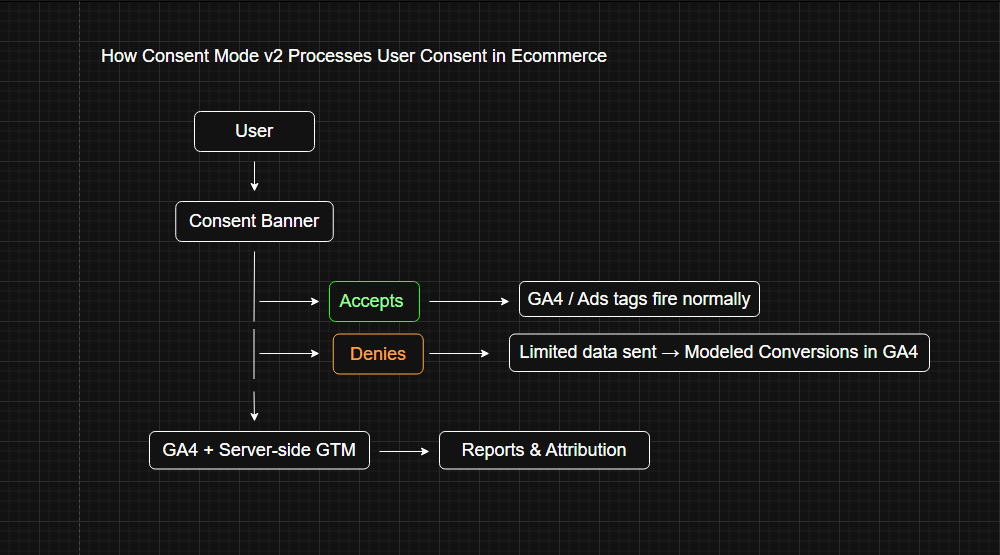
These effectively mandate that your event payloads and consent flags remain synchronized, lest you risk data loss and inaccurate attribution. For instance, when a user denies consent, GA4 will use modeled data to fill reporting gaps.
You’ll also need to respect additional consent types, such as ad user data and ad personalization. Each consent state must be passed downstream to Google Tag Manager (GTM) server containers and API endpoints.
Implementing GA4 Consent Mode v2 With Server-Side Routing
The majority of modern ecommerce stores benefit from a hybrid approach, wherein client-side events fire with consent checks as the server-side GTM handles deduplicated, enriched hits.
Here’s how it works:
- Configure consent defaults in GTM
- Propagate the consent state to ensure it is passed to server containers with each hit
- Deduplicate events to avoid double-counting purchases when both client and server hits are present
- Confirm that server events align with GA4’s attribution windows
You must be thorough when setting up this flow of information, or there will be gaps in your attribution model that will give you a difficult time when identifying the source of conversions.
QA and Debugging Your Setup
Quality assurance helps you avoid silent data loss. The following tools are essential to the process:
- Tag Assistant: Validates consent state propagation and confirms events trigger with the correct parameters
- GA4 DebugView: Cross-checks live events, ensuring values match your ecommerce data layer
- Parity Checks: Compare the volume of client vs. server hits over 24-48 hours to confirm that deduplication is working correctly
You’ll want to run at least one controlled purchase test with consent denied to validate modeled conversion behavior. Hopefully, you’ll find that your setup is free from bugs and errors, but if you uncover any underlying problems, fix them as soon as possible to prevent long-term compliance or data privacy regulation headaches.
Acceptance Criteria for a Clean Deployment
Knowing that your Consent Mode v2 ecommerce implementation was a success is, in itself, another part of the process. Measure your progress against these benchmarks:
- Zero parameter mismatches between client-side and server-side purchase events
- Modeled conversions are visible in GA4 when consent is denied
- All ecommerce events fire with complete parameters
- No Rich Results warnings arise for schema-linked ecommerce data
If you aren’t meeting all of these thresholds, go back and review your server-side routing pathways; there’s a good chance that there is an issue with your deduplication workflow.
Additionally, anytime you make major changes to your site’s attribution model and back-end analytics rules, you should check to ensure you are still meeting those thresholds.
For instance, some backend changes may inadvertently impact the functionality of your site; you should loop back around and check that you achieve an LCP of less than 2.5 seconds on key product and checkout pages.
Frequently Asked Questions
What is Consent Mode v2 for Ecommerce?
Consent Mode v2 is Google’s updated framework for handling user tracking consent and ensuring ecommerce businesses can still collect conversion data while respecting user privacy laws. It was built in response to the increasing number of consumer privacy frameworks, such as the GDPR and CCPA. Several states have similar acts in the works, which will impact when and how you collect consumer data.
Do I Need to Use Server-Side GTM With Consent Mode v2?
You don’t, though it is highly recommended, as it can help reduce data loss and enable deduplication. It also future-proofs your ecommerce site against browser restrictions.
How Do I Know if My Setup Is Compliant?
If consent banners block analytics and ad storage until accepted and modeled, you’re on the right track. You’ll also need to verify that the Tag Assistant shows no warnings. If you receive any red flags or alerts, go back and fix them.
Schedule an Audit With Net Profit Marketing
Your ability to work with Consent Mode v2 can make or break your ecommerce attribution. If you’d like expert help auditing your setup or implementing server-side tagging, reach out to Net Profit Marketing for a consultation today.
Leave a Reply