

Managing BigCommerce redirects and maintaining a clean URL structure is essential for ecommerce operators who want to protect their search equity, streamline crawl efficiency, and deliver a greater overall customer experience.
Unlike platforms with free-form routing, however, BigCommerce runs on theme-driven templates that dictate how product, category, and faceted navigation URLs are handled. Without a clear strategy, parameter sprawl and unmanaged redirects can waste crawl budgets, confuse search engines, and frustrate shoppers.
With that in mind, the following guide explores BigCommerce redirects and URL strategy optimization best practices to help you improve your visibility, promote better rankings, and ensure a smoother customer experience.
Prerequisites for Optimizing Your BigCommerce URL Structure
Before you can dive into adjusting your redirects or URL structures, you must make sure your team has all of the following:
- Theme file access (to edit category templates and implement canonical tag rules)
- Control over robots.txt and sitemap.xml via your BigCommerce dashboard or developer-level overrides
- Redirect management access through the BigCommerce admin panel or CSV import/export for bulk work
Without these capabilities in place, your strategy may stall as early as the planning stage.
How Does BigCommerce Handle URLs?
While BigCommerce automatically generates product and category URLs based on store settings, themes still play an important role. Cornerstone and Stencil themes, in particular, define default product and category paths.
The problem, however, is that these defaults can sometimes create duplicate routes to the same item. Category template options may also expose layered navigation or faceted parameters; filters like “sort by newest item” or “sort by size” can make indexation cluttered.
Furthermore, BigCommerce also allows you to assign page-level canonical tags, and though the feature can be useful, misconfigured canonicals can create SEO headaches. For example, a canonical tag shouldn’t point to itself, but instead consolidate subpages.
Establishing Canonical and Robots Guardrails
A clean URL structure requires clear rules for what should (and should not) be crawled. Faceted parameters, for instance, should canonicalize back to the core category page; if they generate endless crawl paths, block them in robots.txt.
When it comes to sort parameters, you should allow them only if they provide materially different user experiences. Canonicalize or disallow purely cosmetic sorts, such as A-Z vs. Z-A. Session parameters should always be excluded from crawling and sitemap inclusion as well.
Ultimately, you must be strategic during the process to guarantee crawlers spend time on the right pages; you can’t risk losing ranking opportunities because bots are wasting time on the wrong content.
Maintaining Redirect Hygiene at Scale
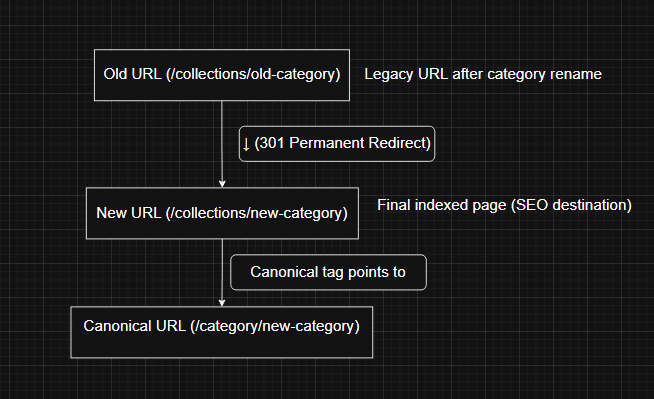
BigCommerce redirects preserve equity when old URLs change due to migrations or renames. Within the platform, you should do the following:
- Use 301s for permanent changes
- Avoid redirect chains, because they slow down crawlers and users
- Perform bulk mapping via CSV files
Here’s an example:
old_url,new_url
/collections/old-category,/collections/new-category
/products/old-sku,/products/new-sku
/blog/old-post,/shopify-seo-checklist
Since consumers must be directed to the right content and URLs at all times, redirects are not something you can afford to get wrong.
Validation and Monitoring
Set measurable target outcomes, such as the following, and validate your results against them regularly:
- A max crawl depth of three or less (to ensure products aren’t buried)
- Zero indexable parameter pages (confirms canonicals and robust rules are being followed
- A redirect chain length of one (to avoid hops)
- Largest Contentful Paint (LCP) of 2.5 seconds or less
- Zero Rich Results warnings
To validate your URLs, choose 20+ parameterized URLs to confirm the correct canonicals. You’ll need to review log files to catch crawl waste, so make sure to monitor Search Console coverage and enhancement reports.
Frequently Asked Questions
Do I Need to Manually Update Redirects Every Time I Rename a Product?
Yes, and that’s because BigCommerce doesn’t automatically handle product SKU changes. A 301 redirect should be created to preserve link equity and keep customers from getting lost on dead pages; any time that happens, you lose out on a potential sale.
Should I Include Redirected URLs in My Sitemap?
Only include live, canonical URLs in your XML sitemap. You need to make it easy for Googlebot to crawl your relevant pages and assign ranking equity accordingly, and you don’t want to confuse search engines or distract crawlers from your primary content.
How Often Should I Audit My Redirects?
Do so at least quarterly, as well as whenever you launch new categories, rename collections, or sunset products.
Master BigCommerce Redirects With Net Profit Marketing
Your BigCommerce store’s performance depends on more than great products; it relies on technical SEO foundations like URL management and redirect hygiene. By setting canonical guardrails, cleaning up parameter sprawl, and maintaining your site’s redirect integrity, you’ll protect search equity and improve the user experience.
If you need help implementing a redirect or URL cleanup plan, contact Net Profit Marketing for a comprehensive audit of your site. Our implementation pros can also assist with redirecting URLs and optimizing your site for maximum visibility.
Leave a Reply